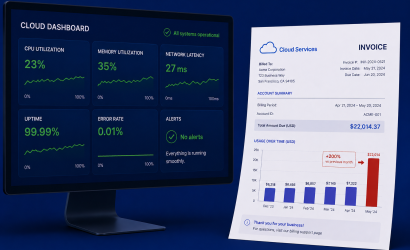
Cloud computing has made infrastructure accessible, but it has also introduced a problem: developers often deploy and scale resources without knowing their cost implications. This results in unpredictable bills and inefficient spending. While FinOps tools exist to help manage costs, integrating cost visibility directly into a developer’s workflow can be a game-changer.
In this post, we’ll explore how to build a system that shows developers their real-time cloud spend during runtime, allowing them to make informed decisions about resource usage.
Or easier – just use Atmoz…
Why Developers Need Real-Time Cost Awareness
Developers control many cost-related factors: instance sizes, database queries, data transfer, and more. Without visibility, they might:
- Use expensive instance types when a smaller one would suffice.
- Run expensive queries against managed databases.
- Transfer large volumes of data between regions without realizing the cost.
- Leave unnecessary services running, accumulating hidden costs.
By embedding cost awareness directly into development and runtime environments, teams can become more cost-conscious and efficient.
Building a Cost Visibility System
We will outline an approach that retrieves and displays cost data in real-time based on actual usage. This involves:
- Gathering Real-Time Usage Data
- Mapping Usage to Cost
- Displaying Cost Data to Developers
- Providing Alerts & Recommendations
1. Gathering Real-Time Usage Data
To track costs, we need to monitor cloud resource usage in real-time. Different cloud providers offer various APIs to extract usage data:
- Azure: Use Azure Monitor, Cost Management API, and Metrics API.
Example: Tracking Compute Costs in Azure
To track Virtual Machine usage, use Azure Monitor:
az monitor metrics list
  --resource /subscriptions/{subscription-id}/resourceGroups/{resource-group}/providers/Microsoft.Compute/virtualMachines/{vm-name}
  --metric "Percentage CPU"
  --interval PT1M
For containerized workloads (AKS), use Kubernetes metrics via Azure Monitor or Prometheus.
2. Mapping Usage to Cost
Usage data alone isn’t enough—we need to correlate it with pricing models. Azure provides detailed pricing tables:
- Azure Pricing Calculator API
Example: Fetching Azure Pricing for a Virtual Machine
az consumption usage list
  --start-date 2024-01-01
  --end-date 2024-01-02
By combining instance uptime with pricing data, we can compute real-time cost estimates.
3. Displaying Cost Data to Developers
Once we have cost data, we must present it where developers see it. Options include:
- IDE Extensions: Show real-time cost estimates in VS Code or JetBrains IDEs.
- CLI Integrations: Display estimated costs in terminal outputs.
- In-App Dashboards: Embed a cost widget in internal tools.
- Pull Requests & CI/CD: Provide cost impact analysis for infrastructure changes.
Example: Showing Costs in a CLI Tool
Modify CLI outputs to include cost estimates:
$ deploy-my-service
Deployment started...
Resource: VM (Standard_D2s_v3) - Estimated Cost: $0.10/hr
Resource: Blob Storage - Estimated Cost: $0.018/GB
4. Providing Alerts & Recommendations
Raw cost data is helpful, but proactive recommendations drive real savings. Implement:
- Cost Threshold Alerts: Notify developers when a resource exceeds a spending limit.
- Optimization Suggestions: Recommend alternative instance types or configurations.
- Idle Resource Detection: Alert users when a resource has low utilization.
Example: Alerting on Cost Spikes in Azure Functions
Use Azure Monitor with Azure Logic Apps to notify when function costs increase:
import requests
def check_function_cost():
    headers = {"Authorization": "Bearer YOUR_ACCESS_TOKEN"}
    response = requests.get(
        "https://management.azure.com/subscriptions/{subscription-id}/providers/Microsoft.CostManagement/query?api-version=2021-10-01",
        headers=headers
    )
    cost_data = response.json()
    cost = float(cost_data["properties"]["rows"][0][1])
    if cost > 10:
        requests.post("https://logic-app-url", json={"message": f'Azure Function cost exceeded: ${cost}'})
Conclusion: Empowering Developers to Be Smart Cloud Buyers
By integrating cost visibility directly into the development workflow, teams can make better decisions before costs spiral out of control. This DIY approach ensures:
- Real-time cost tracking without external FinOps tools.
- Cost awareness in IDEs, CLIs, dashboards, and CI/CD pipelines.
- Proactive alerts to optimize spending.
Implementing this system will not only reduce cloud waste but also empower developers to take ownership of their cloud expenses, leading to smarter, more cost-effective engineering decisions.
Or easier – just use Atmoz…